How to Record Reels Without Shaky Footage
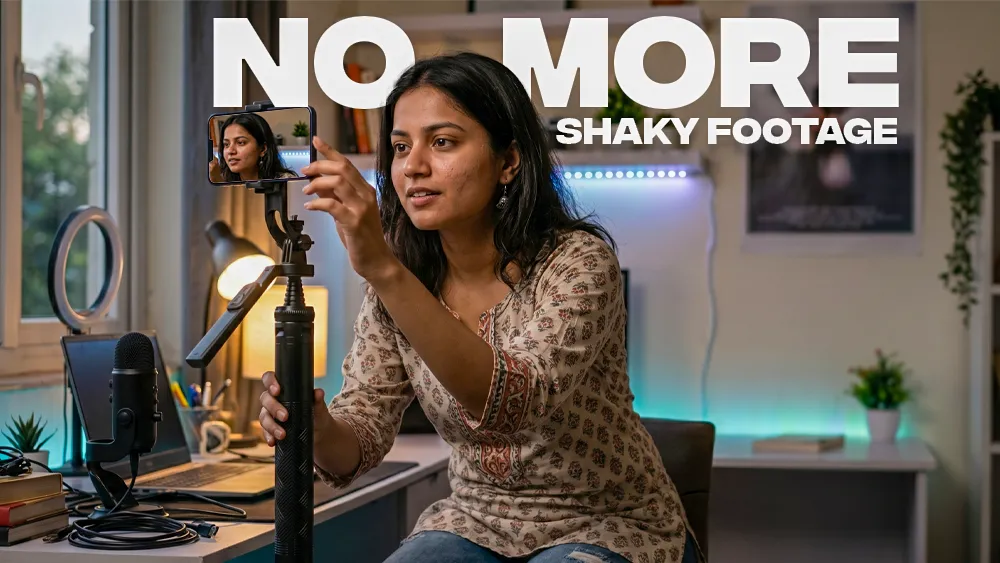
A good Reel can lose attention within seconds if the video keeps shaking.
In 2026, short-form content is more competitive than ever. Whether you post fashion videos, travel clips, gym content, tutorials, or daily vlogs, viewers expect smooth and stable footage. Even high-quality smartphones struggle to create professional-looking videos when the camera keeps moving unintentionally.
The good news is that you do not need an expensive camera setup to fix this problem.
Most creators can dramatically improve their Reels by using better shooting habits and a stable tripod stand for mobile phone.
This guide explains practical ways to record smoother Reels, avoid shaky footage, and improve overall video quality using simple tools and techniques that actually work in real-world content creation.
Why Reels Look Shaky
Shaky footage usually happens because the phone is constantly making small, unwanted movements while recording.
Common reasons include:
- Recording while walking without stabilization
- Holding the phone with one hand
- Using lightweight, unstable stands
- Uneven tripod placement
- Sudden hand movements
- Wind or outdoor vibration
- Poor grip during vertical shooting
Many creators think camera quality is the issue, but stability matters more than megapixels for social media videos.
A stable frame instantly makes content look cleaner and more professional.
Use a Stable Tripod Instead of Handholding
The easiest way to improve Reel quality is to stop recording handheld for every shot.
A strong tripod gives:
- Better framing
- Stable vertical shooting
- Smoother transitions
- Consistent camera angles
- Reduced blur during movement
For indoor and outdoor creators, a durable tripod becomes one of the most useful accessories for mobile content creation.
A lot of creators now prefer a tripod stand for mobile with remote because it allows hands-free recording. This is especially useful for dance videos, fitness content, tutorials, solo travel shots, and Instagram transitions.
The Bluetooth remote also helps avoid camera shake caused by touching the screen to start recording.
Choose the Right Surface Before Recording
Even a good tripod can shake if the ground is unstable.
Before recording:
- Avoid soft beds or cushions
- Place the tripod on flat ground
- Lock all tripod legs properly
- Keep the phone's weight balanced
- Avoid windy corners outdoors
One common mistake is extending the tripod fully on uneven surfaces. Taller setups naturally become less stable if not positioned correctly.
For outdoor shoots, slightly lowering the tripod height often improves stability.
Use Your Phone’s Rear Camera
Many creators use the front camera for convenience, but the rear camera usually provides:
- Better stabilization
- Sharper details
- Improved dynamic range
- Higher video quality
If you are recording alone, a Bluetooth remote helps control recording without touching the phone.
This setup works well for:
- Fashion creators
- Product videos
- Cooking tutorials
- Fitness content
- Travel Reels
- YouTube Shorts
Record in Good Lighting
Low light increases blur and makes shake more visible.
Natural daylight is still one of the best lighting sources for mobile Reels.
For smoother-looking footage:
- Face the light source
- Avoid dark rooms
- Use window lighting indoors
- Shoot during morning or golden hour outdoors
Good lighting improves video sharpness and reduces motion noise that often makes clips appear unstable.
Avoid Fast Random Camera Movement
Many creators move the phone too quickly while recording.
Smooth movement always looks more professional than aggressive motion.
Instead of:
- Sudden pans
- Quick tilts
- Fast handheld movement
Try:
- Slow camera motion
- Controlled angle changes
- Small cinematic movements
- Static stable shots
Modern Reels perform better when viewers can clearly focus on the subject.
Use Wider Angles for Better Stability
Wider framing naturally hides small movements better than zoomed-in shots.
If your footage looks shaky:
- Step back slightly
- Use 0.5x or 1x lens
- Avoid excessive zoom
Zoom amplifies every small movement, especially during handheld shooting.
Tripods become even more important when recording close-up content.
Lock Focus and Exposure Before Recording
Constant autofocus adjustments can make videos feel unstable.
Before recording:
- Tap and hold on your subject
- Lock AE/AF on your phone
- Adjust brightness manually if needed
This prevents distracting exposure shifts during recording.
Use Slow Motion Carefully
Slow-motion Reels can look cinematic, but shaky footage becomes more noticeable in slow motion.
For slow-motion recording:
- Keep the phone completely stable
- Use tripod support
- Avoid unnecessary movement
- Record in bright environments
Stable slow-motion clips usually perform better on Instagram because they feel cleaner and easier to watch.
Best Reel Angles That Look Stable
Some camera angles naturally reduce visible shake.
Popular stable Reel angles include:
| Angle | Why It Works |
|---|---|
| Eye-level shot | Natural and balanced |
| Slight top angle | Cleaner framing |
| Static side shot | Great for tutorials |
| Wide vertical shot | Better movement control |
| Ground-level shot | Cinematic look |
Simple, stable angles often outperform overly complicated camera movement.
Common Mistakes That Make Reels Shaky
Using Cheap Weak Tripods
Very lightweight stands often wobble during recording.
A stronger tripod with better locking support creates more stable shots.
Touching the Phone While Recording
Tapping the screen causes visible shake at the start of videos.
Bluetooth remote controls solve this problem effectively.
Recording One-Handed
One-handed recording increases movement significantly.
Two-handed support or tripod setups improve stability immediately.
Walking Too Fast
Fast walking shots rarely look smooth without stabilization tools.
Move slowly and control your pace.
Real-World Setup That Works for Most Creators
A practical beginner-friendly setup usually includes:
- Smartphone
- Stable tripod
- Bluetooth remote
- Natural lighting
- Clean background
That is enough to create high-quality Reels for:
- YouTube Shorts
- Facebook Reels
- Product videos
- Online classes
- Tutorials
Most viral short videos today are recorded on phones, but the difference comes from stability and framing.
Expert Tips for Smoother Reels
Record Multiple Short Clips
Short clips are easier to stabilize and edit.
Use Tripod Height Properly
Keep the tripod close to chest or eye level for balanced framing.
Clean the Camera Lens
Dirty lenses reduce sharpness and make motion blur worse.
Enable Grid Lines
Grid lines help maintain balanced composition while recording.
Use Airplane Mode
Notifications can interrupt recording sessions unexpectedly.
Is a Tripod Really Necessary for Reels?
For casual videos, maybe not.
But for consistent content creation, a tripod becomes one of the most useful tools you can own.
It improves:
- Video stability
- Professional appearance
- Framing consistency
- Solo recording
- Hands-free shooting
A reliable tripod also reduces recording frustration, especially during longer sessions.
Final Thoughts
Creating smooth Instagram Reels is not about having the most expensive phone.
In most cases, stable framing, controlled movement, proper lighting, and a reliable tripod setup make the biggest difference.
A strong mobile tripod helps improve video quality immediately, especially for creators recording content regularly. Whether you shoot tutorials, travel clips, fitness videos, or product content, stable footage keeps viewers focused on your content instead of distracting camera shake.
Small improvements in stability can make your Reels look far more professional in 2026.
Frequently Asked Questions
Everything you need to know about this product.